
Programming your gate remote properly does more than just open and close your gate. When you set up your gate remote with the right security features, you protect your property from unauthorized access and prevent old or lost remotes from being used by others. Many people skip important security steps during the basic programming process, which can leave their gates vulnerable.
This guide will walk you through the complete process of programming your gate remote while maximizing your security. You’ll learn about different gate systems, the security features built into modern remotes, and how to activate advanced settings that many users don’t know exist. Whether you’re programming a new remote or updating your existing setup, these methods will help you create a more secure access control system.
You don’t need technical expertise to improve your gate’s security. The programming steps are straightforward, and the extra security features take just a few additional minutes to set up. By the end of this article, you’ll know how to program your remote correctly, troubleshoot common issues, and maintain your system’s security over time.
Understanding Gate Remotes and Security Features
Gate remotes control access to your property through radio signals, and understanding how they work helps you protect against security risks like unauthorized access and signal copying.
Why Secure Programming Matters
When you program your gate remote without proper security measures, you leave your property vulnerable to unauthorized entry. Modern gate systems use encrypted signals to prevent intruders from copying or intercepting your remote’s code.
Rolling code technology changes the signal each time you press the remote button. This prevents someone from recording your signal and replaying it later to open your gate. Older fixed-code systems use the same signal every time, making them much easier to hack.
You should also control who has access to your remotes. Each remote you program creates a potential security gap if it gets lost or stolen. Most gate opener receivers can store multiple remotes, but you need to track them carefully and remove any lost remotes from the system’s memory immediately.
How Gate Remotes Operate
Your gate remote sends a radio frequency signal to a receiver unit attached to your gate opener. When you press the button, the remote transmits a coded signal that the receiver must recognize before opening the gate.
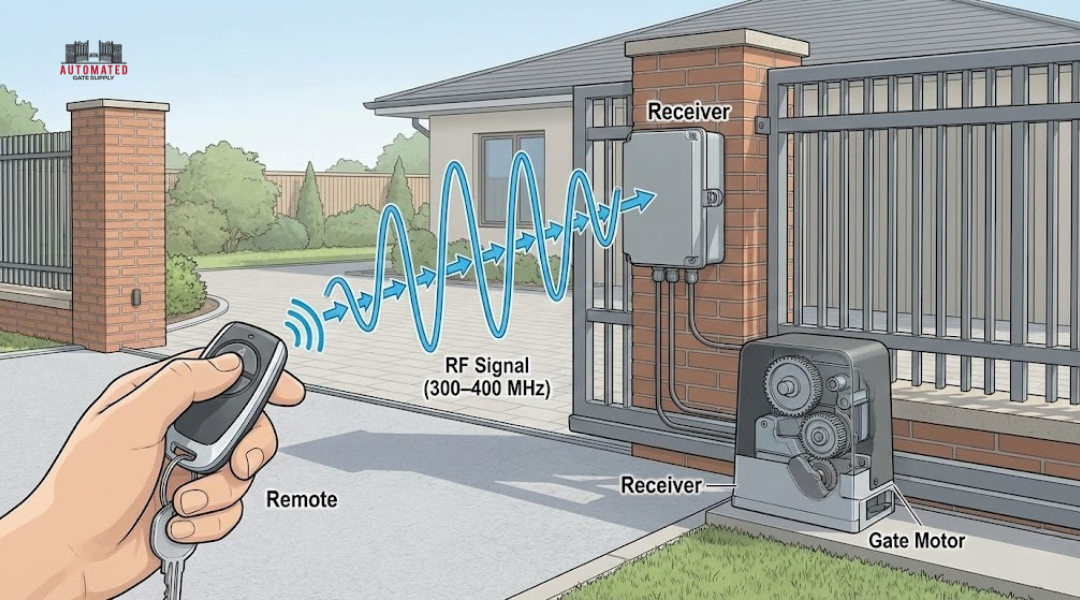
The receiver in your gate opener stores the codes of all programmed remotes in its memory. It compares each incoming signal against these stored codes. If it finds a match, it activates the gate opener motor.
Most modern systems operate on frequencies between 300-400 MHz. The remote contains a small battery that powers a transmitter chip. This chip generates the specific code pattern your receiver expects. The range typically extends 50-100 feet, though walls and interference can reduce this distance.
Common Security Vulnerabilities
Fixed-code systems represent the biggest security risk. These remotes send the same code every time, allowing anyone with a code grabber device to capture and reuse your signal. Older DIP switch remotes fall into this category.
Weak batteries create security problems too. As your remote’s battery dies, its signal becomes weaker and less reliable. You might press the button multiple times, giving potential attackers more opportunities to intercept your code.
Physical security matters as much as digital security. Leaving your remote visible in your car or sharing it with too many people increases your risk. You should also watch for anyone observing you as you enter your gate code or use your remote.
Some receivers lack proper encryption or use outdated security protocols. If your system is more than 10 years old, it might not have modern security features like rolling codes or signal encryption.
Types of Gate Systems and Compatible Remotes
Different gate systems require specific remote types to function properly. The motor type in your automatic gate determines which remotes will work with your setup and what programming method you’ll need to use.
Swing Gate Opener Compatibility
Swing gate openers use arms or hydraulic pistons to pull gates inward or push them outward. These systems typically operate on 315 MHz or 433 MHz frequencies depending on your location and manufacturer.
Most swing gate systems work with both fixed code and rolling code remotes. However, newer installations exclusively use rolling code technology for better security. Your swing gate opener will have a receiver unit mounted inside the control box near the motor.
Check your existing remote for the brand name. Common swing gate brands include LiftMaster, Mighty Mule, FAAC, and Apollo. Each manufacturer produces specific remotes designed for their systems.
If you can’t find a brand-specific remote, universal remotes with learning functions work well with swing gate openers. Just make sure the frequency matches your system.
Sliding Gate Opener Features
Sliding gate openers use a rack and pinion system to move gates horizontally along a track. These systems often handle heavier gates than swing setups.
The remote requirements for sliding gates are similar to swing gates. They use the same frequency ranges and code types. However, sliding gate systems sometimes include additional safety features that affect remote programming.
Many sliding gate openers have built-in receivers that can store 20 to 40 remote codes. This lets you program multiple remotes for family members, employees, or contractors. Some advanced sliding gate systems support multi-button remotes that control multiple gates or activate pedestrian access doors.
Multi-Code and Dip Switch Systems
Older gate systems often use dip switches to set the remote code. These tiny switches inside both the remote and receiver must match exactly for the system to work.
Dip switch remotes have 8 to 12 small switches you set to either on or off positions. You open the remote case and manually set each switch to match the pattern inside your gate receiver. This creates thousands of possible code combinations but doesn’t offer rolling code security.
Multi-code systems represent the bridge between old dip switch technology and modern rolling codes. These remotes can be programmed to work with multiple gate systems by adjusting internal settings. They’re useful if you need to operate gates at different properties or want backup codes available.
| System Type | Code Method | Security Level | Programming Difficulty |
|---|---|---|---|
| Dip Switch | Fixed | Low | Easy |
| Multi-Code | Fixed/Variable | Medium | Moderate |
| Rolling Code | Dynamic | High | Easy |
Preparations for Secure Remote Programming
Before programming your gate remote, you need to gather the right tools, identify your specific gate system, and confirm safe working conditions. These steps protect both your security and your gate motor from potential issues during the programming process.
Gathering Required Tools and Materials
You’ll need a few basic items to program your gate remote successfully. Start with a fresh battery for your remote control, as weak batteries can cause programming failures or unreliable operation. Keep a small flathead screwdriver handy to open battery compartments or access DIP switches on older models.
Have your gate opener’s user manual available for reference. If you don’t have the physical manual, search online using your gate opener’s model number to find a digital copy. You may also need a ladder to reach the control panel on some automatic gate systems.
A pen and paper can help you document switch positions or codes during programming. This creates a backup record if you need to reprogram additional remotes later.
Identifying Gate Opener Model and System
Locate the model number on your gate opener’s control box or motor housing. This information is usually on a label or sticker attached to the main unit. Write down the brand name, model number, and serial number for easy reference.
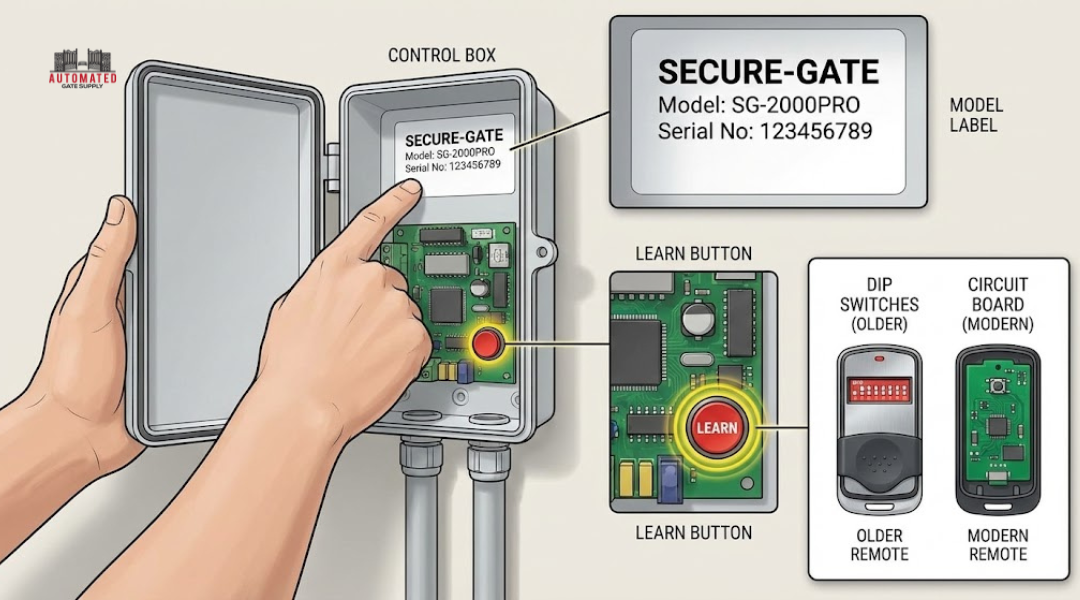
Check what type of programming method your system uses. Modern gate openers typically use a “Learn” button, while older models may rely on DIP switches. Look inside your existing remote to see if it has small switches or just a circuit board.
Confirm whether your gate opener uses rolling code technology or fixed codes. Rolling codes provide better security by changing the signal with each use. Your manual will specify which type your system supports.
Ensuring Proper Power Supply and Safety
Verify that your gate opener has stable power before starting. Check that the circuit breaker for your gate motor is on and functioning correctly. Unstable power during gate opener programming can corrupt the system’s memory.
Clear the gate’s path of any obstacles, people, or vehicles. The gate may move during the programming process, so maintain a safe working area. Never stand directly in the gate’s swing or slide path.
If you need to access the control panel inside the gate motor housing, disconnect power at the circuit breaker first. Wait 30 seconds before opening the housing to allow capacitors to discharge. Only restore power when you’re ready to begin the actual programming steps.
Step-By-Step Gate Remote Programming Methods
Programming your gate remote requires three main approaches: entering programming mode through your control board, syncing directly at the receiver unit, or copying codes from a working remote. Each method provides secure access when done correctly.
Accessing Programming Mode Safely
You need to locate the control board on your gate opener first. The control board sits inside the motor housing or a separate control box near your gate.
Look for a button labeled “Learn,” “Program,” or “Set” on the control board. Some models use CH1 or CH2 buttons instead. The button might be under a protective cover that you need to lift or slide open.
Press and hold this button for 2-5 seconds. Watch for a blinking LED light or listen for a beep sound. This signal means your gate opener is ready to accept a new remote code.
You have about 30 seconds to complete programming once you enter this mode. The system exits automatically if you wait too long. If the light stops blinking before you finish, press the Learn button again to restart.
Programming at the Control Board
Stand near your gate’s control board with your remote in hand. Press the Learn button on the control board to activate programming mode.
Within 30 seconds, press the button on your remote that you want to use. Press it once and release it quickly. Some gate openers require you to press the remote button two or three times.
The control board will confirm successful programming with a blinking light or beep. Test your remote immediately by pressing the programmed button. Your gate should open or close in response.
If you need to program multiple remotes, repeat these steps for each one. Most systems accept 10-20 remotes total before the memory fills up.
Programming with an Existing Remote
Some gate systems let you program a new remote using one that already works. This method works when you cannot access the control board easily.
Hold both remotes close together, about 2-4 inches apart. Press and hold the button on your working remote for 10-15 seconds until its LED starts flashing.
While still holding the original remote button, press the button on your new remote. Hold both buttons down for 3-5 seconds. The new remote’s LED should flash or stay lit to show successful copying.
Release both buttons and test the new remote. This method only works with compatible remotes from the same manufacturer. The new remote receives the same code as your existing one.
Advanced Security Settings and Features
Modern gate remotes include security features that protect your property from unauthorized access and code theft. Rolling code technology and proper code management ensure that only approved users can operate your gate system.
Rolling Code Technology and Encryption
Rolling code technology changes the security code each time you use your gate opener remote. The gate system generates a new code for every button press, making it nearly impossible for someone to copy your signal. This technology protects you from code grabbers that thieves use to steal fixed remote codes.
Your gate opener programming should use Security+ or similar encryption protocols. These systems create billions of possible code combinations that change automatically. When you press your remote button, the gate controller verifies the new code matches the expected sequence before opening.
Most modern gate opener remotes come with rolling code technology built in. Check your manual to confirm your system includes this feature. Older fixed-code remotes remain vulnerable to signal copying and should be replaced with encrypted models.
Erasing or Resetting Existing Codes
Clearing old codes from your gate system prevents previous owners or former users from accessing your property. You need to erase all existing codes when you move into a new home or after losing a remote.
Find the programming button on your gate controller unit. Press and hold it for 10-15 seconds until the indicator light changes. This clears all stored remote codes from memory.
After resetting, you must reprogram each authorized remote individually. Enter programming mode by pressing the controller button briefly. Then press your remote button within 30 seconds to save the new code.
Delete codes for specific remotes by accessing your controller’s advanced settings. Some systems let you remove individual remotes without erasing all codes at once.
Limiting Remote Access
Control who can operate your gate opener by managing the number of active remotes. Most gate systems support 10-40 remote controls, but fewer remotes mean better security.
Issue remotes only to people who need regular access to your property. Use temporary access codes for guests or service workers instead of giving them permanent remotes. Program your controller to accept commands only during specific hours if this option exists.
Set different access levels for family members versus visitors through your gate opener programming menu. Advanced controllers let you enable or disable individual remotes without affecting others. Review your active remote list monthly and remove any unused codes to maintain security.
Troubleshooting and Maintaining Maximum Security
Regular testing confirms your gate remote works properly while preventing security gaps. Addressing signal problems and keeping hardware in good condition protects your automatic gate system from unauthorized access.
Testing and Verifying Remote Functionality
Test your gate remote weekly to catch problems before they affect security. Press the button and watch for immediate gate response. The gate should open or close within two seconds.
Stand at different distances from your gate system to verify range. Most remotes work reliably within 50 to 100 feet. If the response becomes slow or inconsistent, your receiver may have issues that compromise security.
Check that only your programmed remotes can operate the gate. Ask a neighbor to try their remote near your gate. If their remote triggers your system, you need to reprogram immediately. This vulnerability lets unauthorized people access your property.
Press each button on multi-button remotes separately. Each should activate its assigned function without delays. Delete any old or unused remote codes from your receiver’s memory to prevent former owners or employees from entering.
Addressing Interference and Signal Issues
Electronic devices near your gate system can block or weaken signals. Wireless routers, baby monitors, and other automatic gates operating on similar frequencies cause interference.
Move away from your house and test the remote again. If it works better at a distance, household electronics are likely interfering. Adjust your receiver’s antenna position to improve signal strength. Point the antenna straight up or down rather than at an angle.
Metal objects between the remote and receiver also block signals. Remove any new metal decorations, signs, or furniture near the gate motor. Trees and thick walls reduce range as well.
Check if the receiver’s LED light responds when you press the remote button. No light means the signal isn’t reaching the receiver. Replace the receiver if adjusting the antenna and removing obstructions doesn’t help.
Maintaining Batteries and Hardware
Replace remote batteries every six months even if they still work. Weak batteries send inconsistent signals that create security risks. Your gate remote may work sometimes but fail when you need it most.
Use high-quality alkaline or lithium batteries. Cheap batteries leak and damage the internal components. Remove batteries if you won’t use the remote for extended periods.
Inspect the remote casing monthly for cracks or water damage. Moisture inside destroys circuits and makes buttons stick. Keep remotes away from extreme heat and cold. Store spare remotes in a dry location inside your home.
Clean the remote buttons with a dry cloth. Dirt buildup prevents proper contact when you press buttons. Never use water or cleaning solutions that can seep inside. Check the receiver unit for dust, spider webs, or moisture that interferes with performance.