
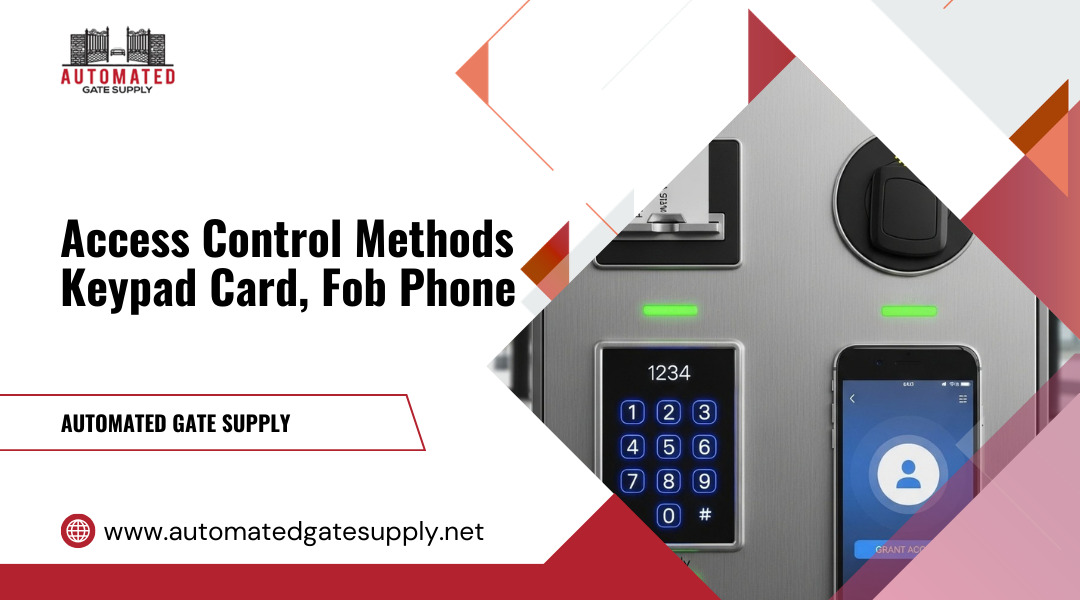
Picking the right access control method for your building affects daily operations, security, and costs for years to come. Keypads, cards, fobs, and smartphones each offer different benefits and limitations. The choice depends on your specific property type, security needs, and how many people need access.
The best access control method balances security, convenience, and long-term management costs while matching your building’s unique requirements. A keypad might work well for a small office with just a few employees, but a smartphone-based system could be better for a large apartment complex where turnover is high. Cards and fobs sit somewhere in the middle for many commercial properties.
Understanding how each credential type actually works helps you make a smarter decision. This guide breaks down the real-world differences between access control methods, including what happens when things go wrong and how these systems perform in North Hollywood’s mix of commercial and residential buildings.
Access Control Methods And System Boundaries
Access control systems operate within distinct technical and operational boundaries that determine how users gain entry and how administrators manage security. The core differences lie in what validates a user’s identity, whether devices work independently or as a network, and how physical hardware connects to digital management tools.
Credentialed Vs Knowledge-Based Entry
Credential-based systems require users to present a physical or digital object for access. Key cards, FOBs, and smartphones serve as tangible proof of authorization. These credentials communicate with door readers through radio frequencies or Bluetooth signals.

Knowledge-based systems verify identity through information only the authorized person should know. PIN codes and passwords fall into this category. You enter your code at a keypad, and the system grants access if it matches stored data.
Credential methods offer stronger security because the physical token is harder to share unintentionally. A lost card can be deactivated remotely in networked systems. Knowledge-based methods eliminate the need to carry anything, but codes can be observed, shared, or forgotten.
Many organizations combine both approaches. You might need both a card and a PIN to enter sensitive areas. This two-factor authentication strengthens your physical security by requiring two separate validation points.
Standalone Devices Vs Networked Systems
Standalone access control devices operate independently at each door. A keypad lock or card reader stores user credentials locally and makes entry decisions without connecting to other systems. You program these devices directly at the hardware level.
Networked access control systems connect multiple entry points through centralized software. Your credentials work across all connected doors, and administrators manage permissions from one location. These systems integrate with video surveillance and alarm systems to create comprehensive security solutions.
Standalone devices work well for single doors or small buildings where remote management isn’t critical. They cost less upfront and don’t require IT infrastructure. Networked systems scale better for multiple locations and provide real-time monitoring, remote lock control, and detailed access logs.
Power and network outages affect these systems differently. Standalone devices with battery backup continue functioning independently. Networked door entry systems may lose remote management capabilities but typically maintain local operation through backup power at each access point.
Where Physical Barriers Intersect Digital Control
Physical access control hardware includes door strikes, magnetic locks, and readers mounted at entry points. These components receive signals from your credential or code input and physically release the locking mechanism.
Digital control systems manage when and how these physical barriers operate. Cloud-based platforms let you program access schedules, create user groups, and receive alerts when specific doors open. Your smartphone becomes both a credential and a management tool.
The intersection matters most during system failures. Electronic locks need clear fail-safe or fail-secure settings. Fail-safe locks open during power loss for emergency exit routes. Fail-secure locks remain locked to protect sensitive areas.
Integration points between physical and digital systems determine your access control solutions’ flexibility. Modern systems connect door hardware to user databases, automatically updating permissions when you hire or terminate employees. This digital-physical bridge eliminates manual programming at each door and reduces security gaps from outdated access rights.
Core Mechanisms Behind Each Credential Type
Access control credentials work through distinct technical processes that determine how users prove their identity and gain entry. PIN codes rely on knowledge verification, RFID technology uses radio frequency communication, and mobile credentials leverage smartphone connectivity and cloud-based systems.
PIN Code Authentication Logic
Keypad entry systems operate through straightforward knowledge-based verification. When you enter your passcode at a keypad, the system compares your input against stored codes in its database. Most keypads connect to a central access control panel that processes the authentication request within milliseconds.

Modern keypad access systems store PIN codes in encrypted formats to prevent unauthorized access to the database. The system can track each code’s usage, allowing administrators to see when specific codes were entered and whether access was granted or denied. Some advanced keypads require multi-digit codes ranging from four to eight numbers, with longer codes providing stronger security.
Time-based restrictions can be programmed into keypad systems, making certain codes active only during specific hours or days. Administrators can quickly deactivate compromised codes without replacing hardware, though you should change shared codes regularly to maintain security. The main weakness remains that passcodes can be shared, observed, or forgotten, making them less secure than credential-based or biometric options.
RFID Cards And Proximity Fobs
Card readers and key fobs function through Radio Frequency Identification (RFID) technology that enables wireless communication. When you hold a keycard or key fob near a proximity reader, the reader emits a radio signal that powers the credential’s internal chip. This chip then transmits a unique identification code back to the reader.
Two main types of RFID technology exist:
- Low-frequency (125 kHz) – Standard proximity cards with limited security features
- High-frequency (13.56 MHz) – Smart cards with encryption and additional data storage
The card reader sends the credential’s ID to the access control panel, which checks if that specific card has permission to enter. This entire process takes less than one second. Key cards can be programmed with multiple access levels, allowing different credentials to open different doors based on user roles.
Key fobs work identically to keycards but come in a smaller, more durable form factor that attaches to keychains. Both credentials can be instantly deactivated if lost or stolen, and they create detailed audit trails showing who accessed which areas and when.
Mobile Credentials And Cloud Authorization
Mobile access control transforms your smartphone into a digital credential through Bluetooth, NFC (Near Field Communication), or cloud-based systems. Mobile credentials store encrypted authentication data directly on your phone, which communicates with compatible readers using short-range wireless technology.
The authentication process involves multiple steps:
- Your smartphone transmits credential data to the reader
- The reader verifies the credential through cloud authorization or local database
- The system confirms your access permissions
- The door unlocks if authorization succeeds
Mobile-based access control offers advantages over traditional credentials because administrators can issue, modify, or revoke smartphone access remotely through cloud platforms. You don’t need to visit a security office to receive a physical card. Mobile credentials also support biometric access features built into your phone, such as fingerprint scanning or facial recognition, adding an extra authentication layer.
Smartphone access requires your phone to have sufficient battery and the appropriate app installed. Some systems support offline mode, storing credential data locally on readers when cloud connectivity is unavailable. Digital credentials can also be time-limited, automatically expiring after set periods for temporary workers or visitors.
Operational Tradeoffs And Risk Exposure
Different access methods create different vulnerabilities in daily operations. PIN codes can be shared among staff, physical credentials get lost or stolen, and battery-powered systems can fail at critical moments.
Shared Codes And Accountability Gaps
Keypad systems create serious problems with tracking who enters your building. When multiple people know the same PIN code, your audit trail becomes useless. You cannot identify which specific person accessed a door at 2 AM on Saturday.
Staff often share codes with coworkers who forgot theirs or with contractors who need temporary access. This breaks your security chain completely. One employee might give the code to a cleaning crew, who then shares it with their replacement staff.
Multi-factor authentication helps reduce this risk. You can require both a PIN and a key card to enter sensitive areas. However, this adds complexity that many users find frustrating.
Some keypad systems let you create unique codes for each person. This improves your access logs significantly. You can see exactly who entered and when. But people still write down complex codes or create simple ones like 1234.
Lost Credentials And Revocation Control
Physical credentials disappear regularly in any building. Employees lose key cards in parking lots, fobs fall off keychains, and phones get stolen. Each lost credential becomes a potential security breach until you deactivate it.
Card and fob systems let you revoke access instantly through your management software. The lost credential becomes worthless within seconds. Traditional keys require expensive lock replacements across your entire building.
Temporary access works well with modern card systems. You can issue a visitor badge that expires automatically after two hours or grant contractor access that ends on Friday at 5 PM.
Phone-based systems offer the fastest revocation control. You can disable credentials remotely from anywhere with internet access. But employees without phones or with dead batteries cannot enter your building. This creates operational delays when people get locked out.
Your encryption strength matters for all electronic credentials. Older card systems use basic codes that hackers can copy with cheap readers. Newer systems use encrypted signals that are much harder to duplicate.
Device Dependency And System Failure Modes
Every access method fails differently when problems occur. Network outages lock people out of buildings with cloud-based phone systems. Dead batteries stop smart locks from opening. Power failures can trap people inside or leave doors unsecured.
Card readers keep working during internet outages because they store access permissions locally. Phone systems need active network connections to verify credentials. You need backup power supplies for any electronic access control.
Audit trails disappear when systems lose power without battery backup. You might have no record of who entered during the outage. Some systems cache access logs locally, then upload them when connectivity returns. Others lose that data permanently.
Human error creates more failures than technical problems. Staff prop doors open, tape over latches, or share credentials to avoid inconvenience. Your access control policy must address these behaviors with clear rules and regular training.
Access Control Realities In North Hollywood Commercial And Residential Environments
North Hollywood properties face specific challenges that directly impact which access control methods work best. High credential turnover in rental markets, compatibility with existing gate and door systems, and exposure to weather and tampering all shape your decision differently than generic security advice suggests.
Multi-Tenant Properties And Credential Turnover
Apartment buildings and commercial spaces with frequent tenant changes require systems that handle constant credential updates without escalating costs. Card and fob systems become expensive when you need to replace lost credentials or deactivate dozens of old ones each month. The plastic waste adds up quickly in buildings with 50+ units.
Keypad systems reduce replacement costs but create security gaps. Former tenants can share codes with others, and you need to reprogram every unit’s access after each move-out. This works better for smaller properties with 10-20 units where turnover is manageable.
Smartphone-based credentials solve the turnover problem through remote activation and deactivation. You can grant or revoke access instantly without issuing physical items. However, this requires tenants to download an app and maintain charged phones. Buildings with older residents often see lower adoption rates.
Property managers in multi-unit buildings should calculate annual credential costs based on actual turnover rates. A 40-unit building with 30% annual turnover replacing fobs at $15 each spends $180 yearly, while mobile credentials eliminate this entirely.
Gate Operators, Door Hardware, And Integration Constraints
Your existing gate operators and door hardware determine which access control methods you can install. Many North Hollywood properties use older gate systems that only support basic relay triggers from card readers or keypads. These systems cannot communicate with cloud-based smartphone credentials without expensive controller upgrades.
Standard lock and key mechanisms on interior doors often conflict with electronic access requirements. Retrofitting electronic strikes or magnetic locks costs $300-800 per door, depending on frame material and power routing needs.
Parking gate turnstiles and vehicle gates need different credential readers than building entry doors. A card reader designed for indoor lobby use will fail quickly on an outdoor gate exposed to sun and dust. You need weatherproof readers rated for outdoor installation.
Check your current door hardware before selecting credentials. Older aluminum-frame doors may not support the weight of biometric readers. Glass doors need specialized mounting brackets for any electronic access device.
Environmental Wear, Vandalism, And Outdoor Installations
Outdoor access points in North Hollywood experience intense sun exposure and occasional vandalism that indoor systems never face. Card readers with exposed swipe slots fill with dust and debris within months. Keypads with rubber buttons deteriorate faster under UV exposure, causing failed reads and service calls.
Touchless smartphone readers reduce physical wear since users never touch the device. This extends hardware lifespan at gates and exterior doors. However, these readers still need weatherproof enclosures and shade protection to prevent screen failure.
Vandalism targets vary by location. Keypads near street-facing gates get damaged more often than readers in enclosed courtyards. Consider metal-housed readers instead of plastic for ground-level installations. Biometric readers are particularly vulnerable since damaged scanner surfaces make the entire system unusable.
Budget for reader replacement every 3-5 years at exposed locations regardless of access method. Even weatherproof equipment degrades faster outdoors than manufacturer specifications suggest for indoor use.